
ANOVA table calculator is an indispensable tool for statistical analysis, providing a streamlined and efficient way to analyze data and draw meaningful conclusions. In this comprehensive guide, we delve into the fundamentals of ANOVA, explore the intricacies of using an ANOVA table calculator, and showcase its advanced features and applications.
From understanding the concepts of ANOVA to interpreting complex statistical results, this guide empowers you to harness the full potential of ANOVA table calculators and unlock valuable insights from your data.
Statistical Analysis with ANOVA Table Calculator
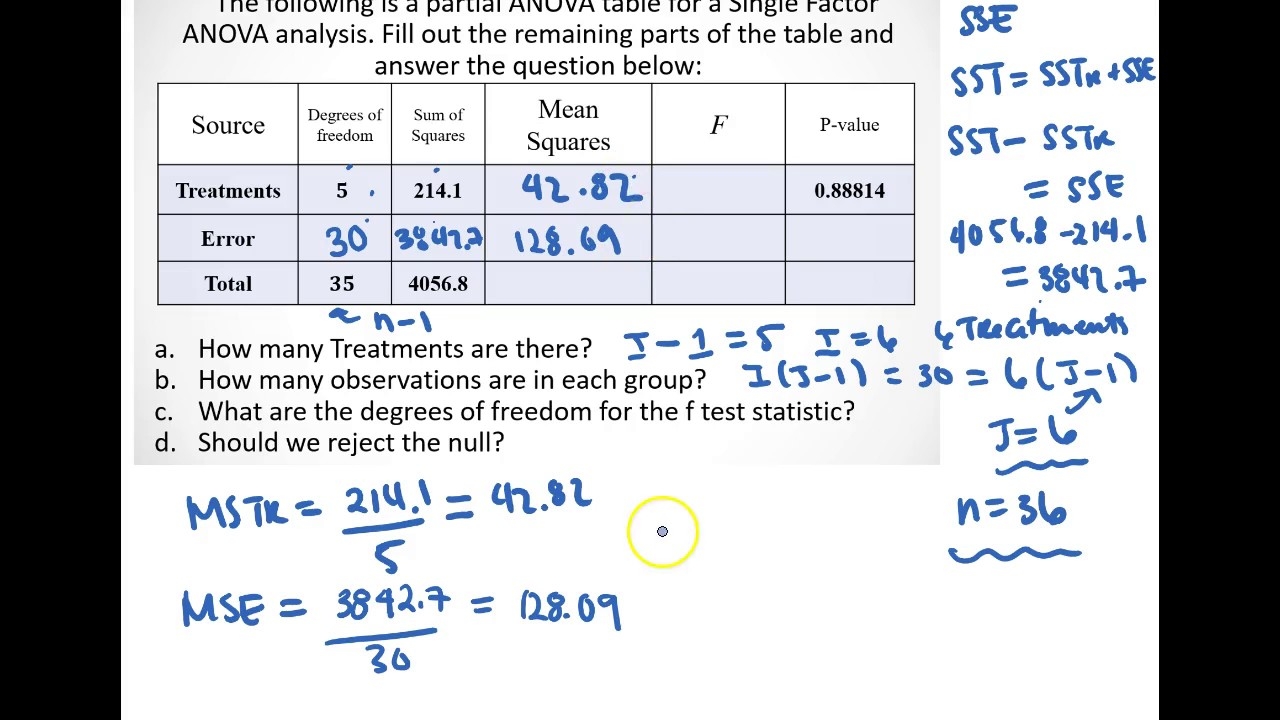
ANOVA (Analysis of Variance) is a statistical technique used to compare the means of two or more groups. It is commonly employed in various fields of research, including psychology, biology, and economics, to determine if there are significant differences between groups.
An ANOVA table calculator is a valuable tool that simplifies the ANOVA analysis process. It automates the calculations and provides a structured output, making it easier to interpret the results and draw meaningful conclusions.
Fundamental Concepts of ANOVA
ANOVA is based on the principle of partitioning the total variance in a dataset into two components: within-group variance and between-group variance. The within-group variance represents the variability within each group, while the between-group variance represents the variability between the group means.
The F-statistic is used to test the hypothesis that the group means are equal. The F-statistic is calculated by dividing the between-group variance by the within-group variance. If the F-statistic is significant (i.e., exceeds a critical value), it indicates that there is a statistically significant difference between the group means.
Using an ANOVA Table Calculator
An ANOVA table calculator typically requires the following input:
- The data values for each group
- The number of groups
- The number of observations in each group
Once the input data is entered, the calculator will perform the ANOVA analysis and generate an ANOVA table. The ANOVA table typically includes the following information:
- The source of variation (e.g., between groups, within groups)
- The sum of squares
- The degrees of freedom
- The mean square
- The F-statistic
- The p-value
The ANOVA table can be used to determine whether there is a statistically significant difference between the group means. If the p-value is less than the significance level (e.g., 0.05), it indicates that there is a statistically significant difference between the group means.
Comprehensive Guide to Using ANOVA Table Calculator
ANOVA (Analysis of Variance) table calculator is a statistical tool used to compare the means of multiple groups. It’s widely used in research and data analysis to determine if there are significant differences between groups.
Step-by-Step Procedure for Using an ANOVA Table Calculator
- Enter your data:Input the data values for each group into the calculator.
- Select the type of ANOVA:Choose between one-way ANOVA (comparing means of two or more groups) or two-way ANOVA (comparing means of groups with two factors).
- Calculate the ANOVA table:The calculator will generate an ANOVA table, displaying the sum of squares, degrees of freedom, mean squares, F-statistic, and p-value for each source of variation.
- Interpret the results:Use the p-value to determine if there are statistically significant differences between the group means. A low p-value indicates a significant difference.
Structure and Components of an ANOVA Table
| Source of Variation | Sum of Squares | Degrees of Freedom | Mean Square | F-Statistic | p-Value |
|---|---|---|---|---|---|
| Between Groups | SSbetween | dfbetween | MSbetween | F | p-value |
| Within Groups | SSwithin | dfwithin | MSwithin | ||
| Total | SStotal | dftotal |
Examples of Data Analysis Using an ANOVA Table Calculator
- Comparing the effectiveness of different marketing campaigns:Use ANOVA to determine if there is a significant difference in sales between different marketing campaigns.
- Analyzing the impact of fertilizer on plant growth:Use ANOVA to compare the mean heights of plants grown with different fertilizers.
- Testing the significance of differences between multiple treatment groups:Use ANOVA to determine if there is a statistically significant difference in the mean responses to different treatments.
Advanced Features and Applications of ANOVA Table Calculator
Beyond basic ANOVA analysis, advanced ANOVA table calculators offer additional features that enhance data interpretation and expand the scope of applications. These features include post-hoc tests and effect size calculations, which provide deeper insights into the statistical results.
Post-hoc Tests
Post-hoc tests are statistical procedures conducted after ANOVA to determine which specific group means differ significantly from each other. Common post-hoc tests include Tukey’s HSD (Honestly Significant Difference), Bonferroni, and Scheffé tests. These tests control the family-wise error rate (FWER), ensuring that the probability of making at least one Type I error (false positive) is kept below a specified level.
Effect Size Calculations
Effect size measures the magnitude of the effect of the independent variable(s) on the dependent variable. ANOVA table calculators can calculate effect sizes such as partial eta squared (η 2) and Cohen’s d. These measures indicate the proportion of variance in the dependent variable explained by the independent variable(s) and provide a standardized measure of effect strength, respectively.
Applications
ANOVA table calculators find applications in various fields of research and data analysis, including:
- Psychology:Comparing the effectiveness of different treatments or interventions.
- Education:Evaluating the impact of teaching methods on student performance.
- Medicine:Assessing the efficacy of new drugs or treatments.
- Business:Analyzing the effects of marketing campaigns on sales.
- Engineering:Comparing the performance of different designs or materials.
Choosing the Right ANOVA Table Calculator for Your Needs
Selecting the appropriate ANOVA table calculator is crucial for efficient and accurate data analysis. With various options available online, understanding their key features and suitability for different requirements is essential.
Key Considerations for Choosing an ANOVA Table Calculator
- Data Input Format:Consider the data format your calculator supports (e.g., CSV, Excel, raw data entry).
- Statistical Tests:Ensure the calculator offers the specific ANOVA tests you need (e.g., one-way, two-way, repeated measures).
- Graphical Output:Some calculators provide graphical representations of results, such as box plots or scatterplots.
- Ease of Use:Choose a calculator with an intuitive interface and clear instructions.
- Export Options:Determine if you need to export results to other software or formats (e.g., PDF, CSV).
Final Conclusion: Anova Table Calculator

Whether you’re a seasoned researcher or just starting your journey in statistical analysis, ANOVA table calculators offer a powerful solution to simplify complex calculations and enhance your understanding of data. Embrace the power of ANOVA and unlock the secrets hidden within your data.
